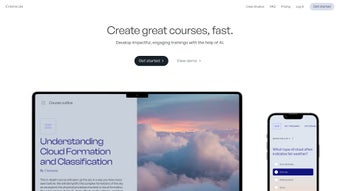

Download Courseau – AI-Powered Course Creation Tool for Educators & Creators
Courseau is a revolutionary AI-driven education platform that empowers educators, coaches, and content creators to instantly transform voice notes, webinars, books, and more into interactive, branded online courses. With advanced transcription and course structuring powered by artificial intelligence, Courseau eliminates the tedious manual work traditionally involved in course development. Whether you're a teacher looking to digitize lectures, a coach launching a personal brand, or a business training employees, Courseau streamlines the entire process—from content ingestion to publication—without requiring technical skills.
The platform supports multimedia integration, customizable course layouts, and seamless sharing across devices. With flexible pricing plans, including a free tier for personal use, Courseau makes high-quality course creation accessible to everyone. Discover how Courseau can help you turn your knowledge into engaging, scalable learning experiences—secure, fast, and updated regularly with new AI features.
Key Features of Courseau
Courseau stands out in the crowded e-learning space by combining powerful AI with intuitive design. One of its most impressive features is the AI transcription engine, which accurately converts spoken content—like voice memos, recorded lectures, or webinar recordings—into structured course transcripts. This isn’t just basic speech-to-text; Courseau’s AI intelligently identifies speaker changes, timestamps segments, and even suggests chapter breaks based on topic shifts. This means you can turn a 45-minute webinar into a well-organized course with clear modules in under 10 minutes.
Another standout feature is content versatility. Unlike many course platforms that only accept pre-written scripts, Courseau accepts audio, video, PDFs, and even raw text. This flexibility allows educators and creators to repurpose existing materials effortlessly. For instance, a teacher can upload a scanned textbook chapter and have Courseau generate a multimedia course with embedded quizzes and visual summaries. The platform also supports custom branding—add your logo, color scheme, and domain name to make your course feel professional and unique.
Interactive learning tools are built-in, including automated quiz generation, progress tracking, and discussion forums. Courseau’s AI doesn’t just transcribe—it analyzes content to suggest relevant questions, summaries, and even flashcards. This enhances learner engagement and retention. Additionally, the platform offers collaboration tools for teams, making it ideal for schools, training departments, and agencies. With real-time updates and regular feature rollouts, Courseau continues to evolve, ensuring users always have access to the latest in AI-powered education technology.
How to Install and Use Courseau
Getting started with Courseau is simple and requires no technical expertise. First, visit the official website and sign up for a free account. The registration process takes less than a minute and includes email verification. Once logged in, you’ll be guided through a quick onboarding wizard that helps you choose your use case—whether you're creating a personal course, a corporate training module, or an academic curriculum.
To create your first course, click the “Create New Course” button and upload your content. You can drag and drop audio files (MP3, WAV), video files (MP4), PDFs, or even paste text directly. Courseau’s AI immediately begins processing the file, transcribing it and organizing it into logical sections. Within minutes, you’ll see a draft course outline with suggested chapters, key topics, and interactive elements.
Next, customize your course. Use the drag-and-drop editor to rearrange modules, add multimedia like images, diagrams, or embedded videos, and insert quizzes and assignments. You can also adjust the branding—upload your logo, choose a theme, and set a custom domain if you’re on a paid plan. Once satisfied, publish your course with a single click. It’s instantly live and accessible via a shareable link or embedded on your website.
For ongoing management, Courseau offers a dashboard where you can monitor student progress, view analytics, and receive feedback. You can also schedule automatic updates—such as adding new content or revising quizzes—ensuring your course stays current. Regular software updates are pushed automatically, so you always have access to the latest features without manual intervention.
Compatibility and System Requirements
Courseau is a cloud-based platform, meaning there’s no installation required. It runs seamlessly across all major operating systems, including Windows, Mac, Android, and iOS. Whether you're using a desktop, laptop, tablet, or smartphone, you can access Courseau through any modern web browser such as Chrome, Safari, Firefox, or Edge. This cross-platform compatibility ensures that educators and creators can work from anywhere, at any time.
The platform is optimized for both high-speed and low-bandwidth connections, so users in remote areas or with limited internet access can still use Courseau effectively. It supports a wide range of file formats: audio (MP3, WAV, M4A), video (MP4, MOV), PDFs, DOCX, and plain text. For content creators using mobile devices, Courseau offers a responsive mobile interface that adapts to smaller screens, allowing you to record voice notes or review course drafts on the go.
Security is a top priority. Courseau uses end-to-end encryption for all uploaded files and ensures data privacy with compliance to GDPR and COPPA standards. All user data is stored securely in encrypted cloud servers, and you retain full ownership of your content. The platform also offers two-factor authentication (2FA) for added account protection. With regular updates and a dedicated support team, Courseau ensures a stable, secure, and future-proof experience across all devices and platforms.
Pros and Cons of Courseau
Pros
- AI-Powered Transcription – Accurately converts voice and video into structured course content with minimal manual input.
- Content Versatility – Accepts audio, video, PDFs, and text, enabling easy repurposing of existing materials.
- Custom Branding – Add your logo, colors, and domain to create a professional, personalized course experience.
- Interactive Learning Tools – Built-in quiz generator, progress tracking, and discussion forums boost engagement.
- Free Tier Available – Personal users can create and publish courses at no cost.
- Regular Updates – Continuous AI improvements and new features ensure long-term value.
Cons
- Limited Free Plan Features – The free version has lower course generation limits and lacks advanced analytics.
- Dependent on Internet Connection – Requires stable internet for uploading and editing large files.
- Advanced Features on Higher Tiers – Some collaboration and automation tools are locked behind premium plans.
- Learning Curve for New Users – While intuitive, first-time users may need time to explore all customization options.
- No Offline Mode – Cannot edit courses without an active internet connection.
Frequently Asked Questions (FAQ)
Can I use Courseau for free?
Yes, Courseau offers a free plan ideal for individuals and personal projects. It allows you to create and publish up to 3 courses per month with basic features, including AI transcription, simple branding, and access to core learning tools. While advanced analytics and team collaboration are reserved for paid plans, the free tier is perfect for testing the platform and launching your first course.
Is Courseau compatible with Windows and Mac?
Absolutely. Courseau is a web-based platform, so it works seamlessly on both Windows and Mac computers. You just need a modern browser like Chrome, Safari, or Firefox. No downloads or installations are required, and the interface is fully responsive, providing a smooth experience across all screen sizes.
Can I convert a book into a course using Courseau?
Yes, you can upload a PDF of your book or paste text from a manuscript directly into Courseau. The AI will analyze the content, extract key topics, suggest chapter divisions, and generate interactive elements like quizzes and summaries. This makes it easy to turn written content into an engaging, multimedia course without rewriting.
Does Courseau support mobile devices?
Yes, Courseau is fully mobile-friendly. You can access your courses, record voice notes, and manage content from Android and iOS devices via the web browser. While there’s no dedicated mobile app yet, the responsive design ensures a smooth experience on smartphones and tablets.
How secure is my content on Courseau?
Courseau prioritizes data security with end-to-end encryption, GDPR and COPPA compliance, and two-factor authentication. Your content is stored in secure cloud servers, and you retain full ownership. No third parties access your materials without your consent, ensuring a safe and private learning environment.
Conclusion: Why Courseau is a Game-Changer in Online Education
Courseau redefines what’s possible in course creation by merging AI intelligence with user-friendly design. Whether you’re an educator, coach, or business professional, this platform turns your knowledge into polished, interactive courses in minutes—not weeks. The combination of accurate AI transcription, content versatility, and customizable branding makes it a top choice for anyone serious about digital learning.
While the free plan is excellent for beginners, upgrading to Mini+Pro or Enterprise unlocks advanced features like team collaboration, automation, and detailed analytics—ideal for scaling your impact. With continuous updates and strong security, Courseau is not just a tool; it’s a long-term partner in your educational journey.
Ready to transform your ideas into powerful learning experiences? Download Courseau today and start creating your first AI-powered course—secure, fast, and free to try.



.png)



